Inside the Foxit account console
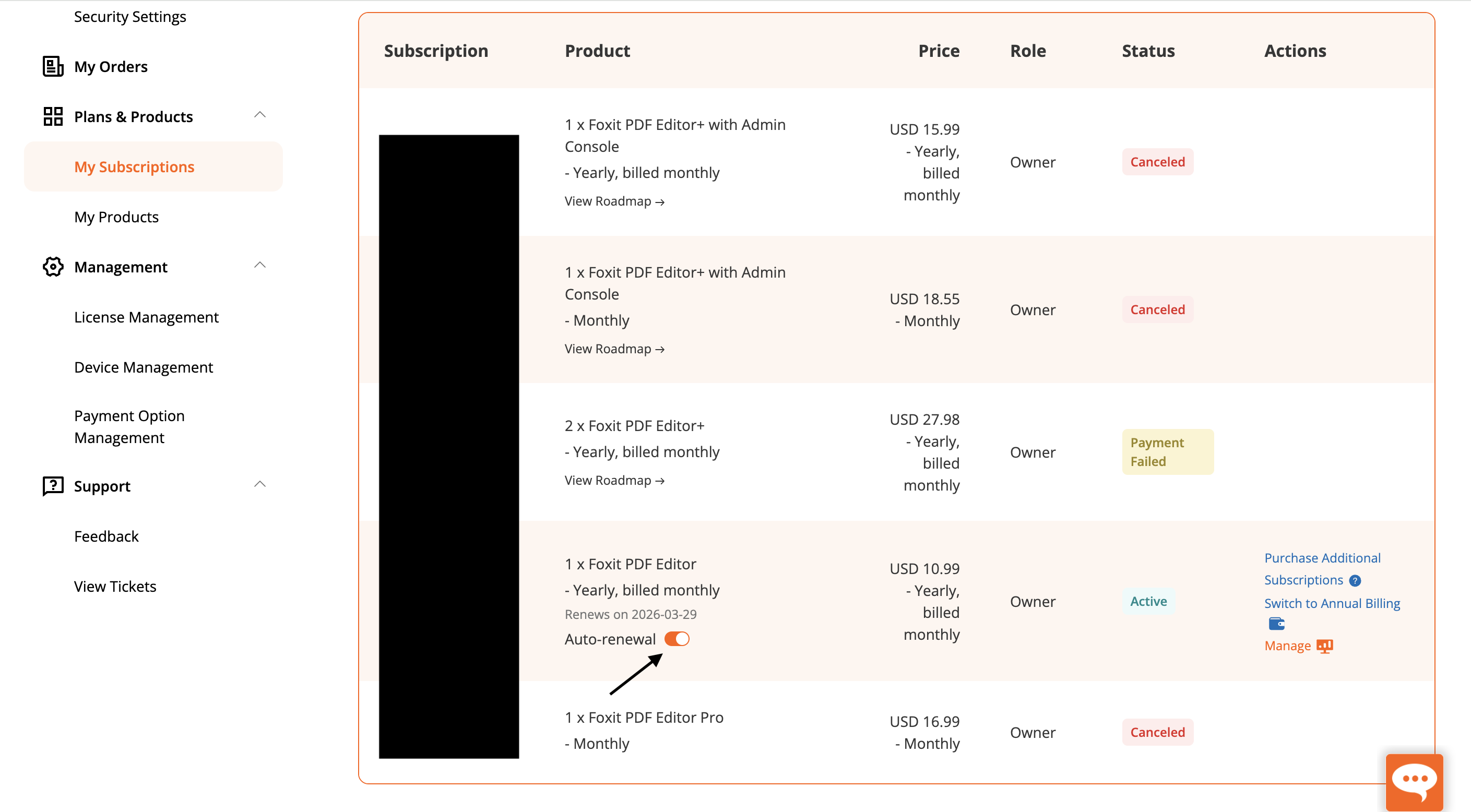
Foxit's My Subscriptions screen provides a detailed table with columns for Subscription, Product, Price, Role, Status, and Actions. The surrounding navigation also exposes orders, products, license management, device management, payment options, support, feedback, and tickets.
For administrators, this is useful coverage. A single view shows product quantities, billing cadence, account ownership, renewal state, and actions such as purchasing additional subscriptions or managing an active plan.
Monthly versus yearly billed monthly
The most important distinction in the reviewed account is between a true Monthly plan and a Yearly plan billed monthly. Both create a recurring monthly charge, but they do not necessarily create the same contractual commitment. The table displays examples of both alongside PDF Editor, PDF Editor Pro, and PDF Editor+ with Admin Console.
Buyers should not compare only the monthly amount. They should confirm the commitment length, renewal date, cancellation policy, included administration features, seat count, and whether the displayed price excludes tax. Annual billing paid in monthly installments can be easy to mistake for a cancel-anytime monthly subscription.
A monthly charge is not always a monthly commitment — Foxit buyers need to read the billing cadence and term together.
What the observed prices do — and do not — tell us
The screenshot shows account-specific examples including USD 10.99 for PDF Editor on a yearly term billed monthly, USD 15.99 for PDF Editor+ with Admin Console on a similar cadence, USD 18.55 for a monthly Editor+ plan, USD 16.99 for PDF Editor Pro monthly, and USD 27.98 for two Editor+ seats on a yearly term billed monthly.
These values document one account state, not a current public pricing guarantee. Pricing can change by region, promotion, tax treatment, purchase date, product generation, and seat quantity. Use the figures to understand how Foxit represents plans, then verify the live checkout total and governing terms before purchasing.
Status, auto-renewal, and payment visibility
The console distinguishes Active, Canceled, and Payment Failed subscriptions with visible status badges. An active subscription shows its next renewal date and an auto-renewal toggle, while the Actions column links to additional purchases, annual billing changes, and management tools.
This transparency is valuable, particularly for an account containing several historical subscriptions. The same density can become confusing when similarly named products remain in one long list, so administrators should reconcile active seats and remove avoidable duplication before assigning licenses.
Verdict
Foxit's subscription console exposes the operational information a software administrator needs: products, quantities, prices, roles, statuses, renewal behavior, and management actions. Its dedicated license, device, and payment navigation suggests a platform designed to support more than a single personal purchase.
The weakness is plan clarity. Similar product names and mixed billing cadences demand careful reading, especially when annual commitments are charged monthly. Foxit can be cost-effective, but the safest buying process is to document the exact edition, included apps, seat count, term, and renewal rules before checkout.
Read our full independent review of this product.
This is an affiliate link — we may earn a commission at no extra cost to you.