What is Foxit Pay?
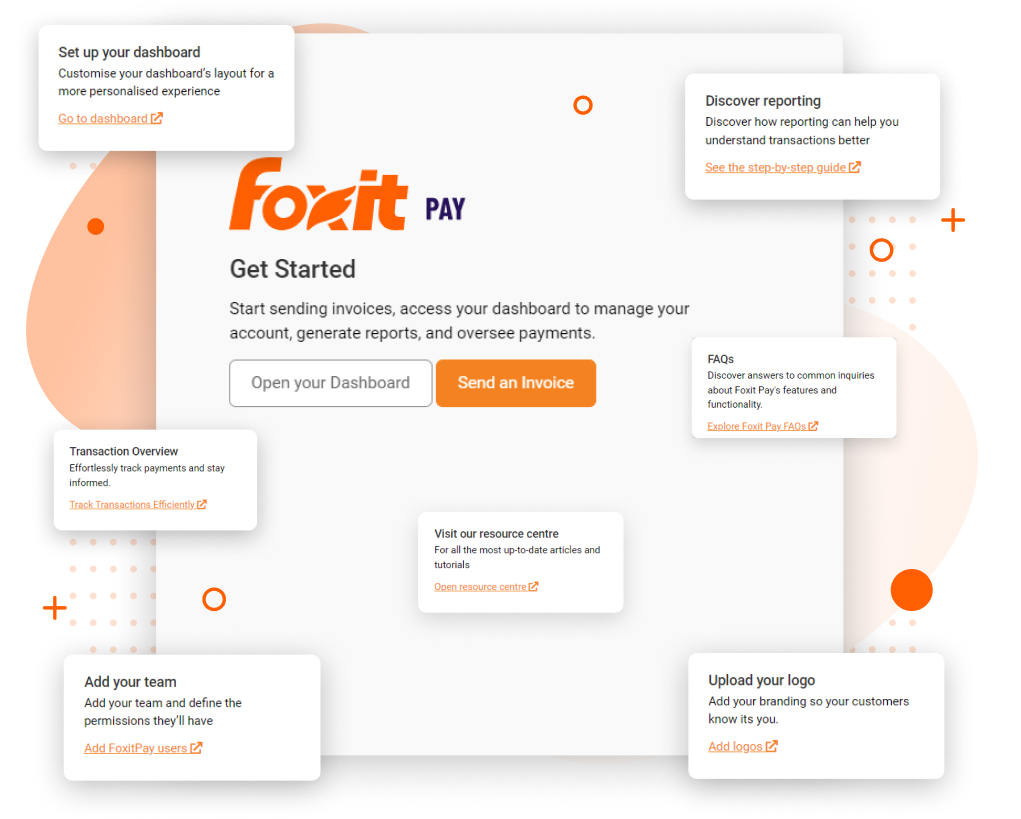
Foxit Pay extends the Foxit ecosystem from creating documents into requesting and monitoring payment. Its getting-started page centers two actions — Open your Dashboard and Send an Invoice — and describes the product as a place to manage an account, generate reports, and oversee payments.
The natural use case is a document-driven transaction: a business prepares an agreement or invoice, sends it to a customer, and then needs visibility into whether the resulting payment was completed.
A guided dashboard rather than an empty screen
The onboarding screen surrounds the central workspace with practical prompts. Users can set up the dashboard, discover reporting, review a transaction overview, visit FAQs and the resource center, add team members, and upload a company logo.
This design avoids the blank-dashboard problem common in financial software. New users receive several useful next steps without being forced through one rigid setup wizard, and they can move directly to sending an invoice when speed matters.
Foxit Pay gives a new account operational next steps immediately: send an invoice, track transactions, configure the team, and learn the reports.
Reporting, transactions, and team controls
Reporting and transaction tracking are prominent enough to be treated as core capabilities rather than secondary settings. This should help finance and operations users move from an individual invoice to a broader view of payment activity.
The Add your team prompt specifically mentions defining user permissions. That is important for businesses separating invoice creation, payment oversight, and administration. Logo upload adds customer-facing branding, though buyers should inspect the final invoice and payment experience during a trial to ensure it matches their brand requirements.
Where Foxit Pay fits — and where it may not
Foxit Pay is most relevant to service businesses and document-heavy teams whose proposals, contracts, or invoices lead directly to a transaction. Keeping payment actions close to the PDF ecosystem can reduce tool switching and preserve context.
It is less compelling for companies that already run billing through a mature accounting or commerce platform. Before adopting it, teams should verify accounting integrations, payment methods, processing fees, regional availability, settlement timing, refund workflows, and reconciliation support directly with Foxit.
Verdict
The reviewed Foxit Pay dashboard makes a strong first impression: it is approachable, action-oriented, and broad enough to cover invoices, transactions, reports, users, and branding. It complements Foxit's document tools logically rather than feeling entirely unrelated.
The final buying decision depends on operational details that a screenshot cannot establish, particularly fees, integrations, and payment availability. Teams should treat the dashboard as evidence of a coherent workflow and validate the financial infrastructure in a live trial.
Explore the product profile, category, and related research.
This is an affiliate link — we may earn a commission at no extra cost to you.